MCP + RAG: Semantic Code Search Over Your GitHub Repos
Introduction
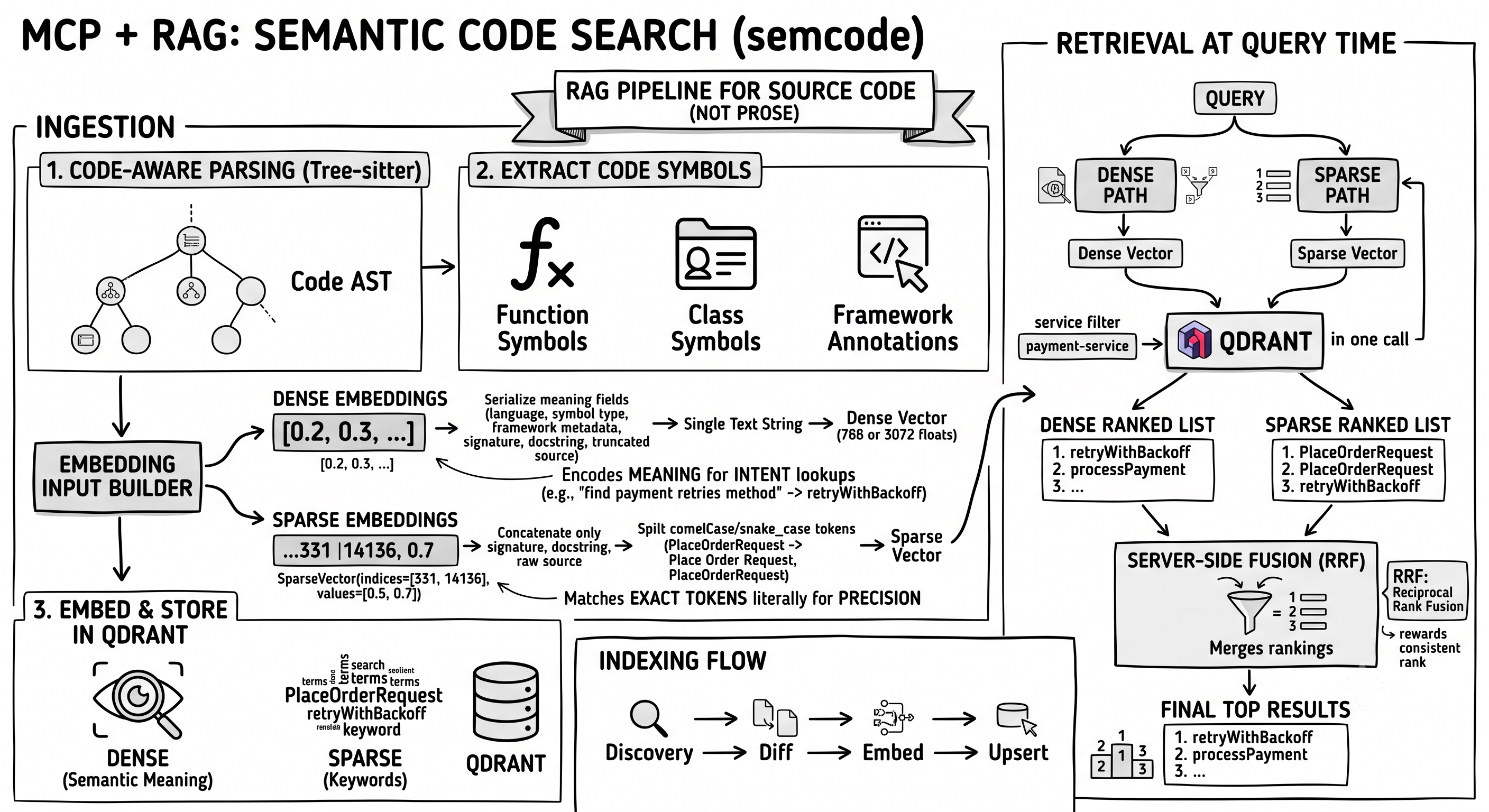
This blog post explains the RAG (retrieval-augmented generation) pipeline behind semcode, an MCP server that does semantic code search across your GitHub repositories. It covers both parts of the pipeline: the ingestion side — how repositories are found, how code is parsed into symbols with Tree-sitter, how embedding inputs are constructed both dense and sparse, and how points land in Qdrant incrementally — and the retrieval side — how queries are encoded into both dense and sparse vectors and fused server-side with RRF (Reciprocal Rank Fusion). Along the way we’ll cover why a hybrid dense+sparse approach beats either one alone for code, and why the payload stored next to each vector matters as much as the vector itself.
Audience: engineers familiar with RAG, embeddings, and vector DBs, curious about applying RAG to source code specifically (not prose).
Why RAG for code is different from RAG for documents
Most RAG systems are built around prose — PDFs, internal documentation, wikis… The content is natural language written for humans, meaning is carried in sentences, and semantic search over plain text works well, and when you add second stage retrieval (reranker), you get a system that can answer your questions with high confidence. Code is different: it’s structured and symbolic, written for humans to read but also for compilers and interpreters to execute. Meaning is distributed across structure, not sentences:
- A function name (retryWithBackoff) carries intent
- The signature (attempts: int, delay_ms: int) carries a contract
- The body carries implementation details
- Annotations (@Retryable, @CircuitBreaker) carry framework behavior
- The class it belongs to (OrderProcessingService) carries domain context
None of that is a sentence. You can’t chunk code by paragraph — you chunk by symbol (function, class, method). Let’s see how that is implemented in semcode.
From source files to Code Symbols - Tree-sitter parsing
What is an AST?
An Abstract Syntax Tree is a tree representation of source code’s grammatical structure (logical parts of this code and how do they relate to each other). Every construct in your code — a function definition, a class, an if statement, a variable assignment — becomes a node in the tree, where parent-child relationships express nesting and ownership.
For clarity, bellow is a pruned AST. Just to give you a mental model of how a parser sees a function: a decorated async definition with typed parameters, a return annotation, and a body containing a docstring and a single return.
|
|
Tree-sitter parses that function into the following AST:
|
|
What is Tree sitter?
Tree-sitter is a parser generator tool. It can build a concrete syntax tree for a source file and efficiently update the syntax tree as the source file is edited. Tree-sitter official documentation
What is a Code Symbol in semcode?
A symbol is one named, self-contained unit of code that a language considers meaningful — a function, a class, a method, an interface, a React component, a hook… In semcode a symbol is a CodeSymbol dataclass, which captures everything needed to search, understand, and locate it without reading the surrounding file.
What a CodeSymbol carries:
name / symbol_type / language — These uniquely describe what kind of thing this is (save,
method, java), and are stored on the point so results can be displayed and grouped by language or type.
signature — The declaration line only, e.g. def save(self, db: Session) -> User. This is what you’d see in an
IDE’s autocomplete popup — compact enough to show in search results without including the full body.
source — The complete raw text of the symbol — from its declaration through the end of its body. This is what gets embedded into the
vector store, giving the model the full implementation context when a chunk is retrieved.
start_line / end_line — Position recorded by Tree-sitter during parsing, used to link a search result back
to an exact location in the file.
parent_name / package — Structural context. parent_name says which class owns this method; package says
which Java package or Python module the file belongs to. Without these, two methods both named save in different services are
indistinguishable.
annotations / extras — Language-specific enrichment. A Java @GetMapping("/users") lands in annotations; the
extracted HTTP route string (GET /users) lands in extras. For React, extras flag whether a component uses hooks,
or whether a function matches the React component signature pattern.
Example:
|
|
So the full pipeline is:
Tree-sitter parses code into an AST. The parser goes through that AST node by node, asks each node where it starts/ends
and what it contains, and puts all of that into a CodeSymbol — one symbol per meaningful language construct.
Building the embedding input
Now, having knowledge about CodeSymbols, we can build the input for a vector database. In semcode
Qdrant is used for to store vectors, we have two types of inputs: dense and sparse embeddings.
What are dense embeddings?
Dense embeddings encode the meaning of text into a fixed-size vector of floating-point numbers — typically
hundreds or thousands of dimensions depending on which embedding provider is chosen. Two pieces of text that express the
same idea will land close together in that vector space even if they share no words in common. For code search this
means a query like “find the method that handles payment retries” can surface retryWithBackoff()
without those words appearing anywhere in the source.
|
|
What are sparse embeddings?
Sparse embeddings work the opposite way: instead of capturing meaning, they represent text as a large vocabulary
vector where almost every entry is zero and only the terms that actually appear get a non-zero weight. BM25 (Best Match 25)
is the algorithm behind this — it scores each token by how often it appears in a document relative to how common it
is across the whole corpus. This makes sparse embeddings excellent at exact keyword matching: if you search for
PlaceOrderRequest or @Transactional, BM25 will find every document that contains those tokens precisely.
|
|
How does semcode build the dense input?
The whole CodeSymbol object is not embedded directly — it is first serialized into a single text string, and that
string is what the embedding model sees. One symbol produces one string, which produces one vector: an array of
floating-point numbers (e.g. 768 or 3072 floats depending on the provider). The CodeSymbol fields that carry
meaning go into that string.
It starts with a human-readable preamble that names the language, symbol type, parent class, and owning service, then
layers in framework-specific metadata — Spring stereotypes, HTTP method and route, annotations — followed by a truncated
docstring and the full signature. Finally, the raw source body is appended. The goal is to give the embedding model everything it
would need to understand the symbol’s role, not just its implementation.
Putting it together, the list_users symbol from earlier serializes into a single string like this:
|
|
Everything above the blank line is the metadata preamble plus the (delimiter-stripped) docstring; below it sit the
signature and then the full source body. That entire block is what becomes one dense vector. Notice the signature
appears twice — once on its own line as structured metadata, and again as the first line of the raw source.
The fields that are useful for displaying results (like start_line, end_line, file_path, signature, source)
or filtering them (like service) are stored separately as the Qdrant payload —
they sit next to the vector but are never embedded.
How does semcode build the sparse input?
Building BM25 text input is minimal — it concatenates only the signature, docstring, and raw source, with no metadata.
It splits camelCase and snake_case identifiers into their component words while keeping the original form alongside. A
token like PlaceOrderRequest becomes Place Order Request — so BM25 can match the exact identifier and a
natural-language query like “place order request” that doesn’t use the original casing.
Why does sparse matter when the dense input is already rich? Dense embeddings excel at intent — a query like “find
the method that retries payments” can surface retryWithBackoff even if no query word appears in the source — but that
power trades precision for meaning, and rare or project-specific identifiers like PlaceOrderRequest get smoothed
toward neighboring concepts in the model’s vector space. BM25 fills exactly that gap: it matches tokens literally with
no compression, and semcode’s code-aware tokenization splits PlaceOrderRequest into Place Order Request
alongside the original, so it handles both exact identifier lookups and natural-language queries that dense alone would miss.
So the full picture is:
Every CodeSymbol produces two inputs. The dense input is wide and context-rich — it tells the model the symbol’s
place in the system. The sparse input is narrow and literal — it gives BM25 the exact tokens to match against. Both
are computed in the same pipeline step and stored together as a single point in Qdrant.
What goes into Qdrant: the named-vector schema
In the previous section it’s explained that we have two inputs per symbol — dense and sparse — stored together in Qdrant. This section explains how they are stored: the shape of a single stored point and why that shape matters at query time.
Named vectors: two vectors, one point
Qdrant lets a single point carry multiple vectors under distinct names, each with its own distance metric and index.
semcode uses this directly: the code_symbols collection defines two named vectors per point.
text-dense— cosine distance, dimensionality set by the embedding provider.text-sparse— Qdrant’s native BM25 sparse index.
The advantage of named vectors over two parallel collections is that one point ID identifies one symbol everywhere. Dense and sparse retrievers always agree on what “document 42” means, which is what makes server-side fusion (next section) possible in a single round-trip.
Anatomy of a stored point
Alongside the two vectors, there is the payload — the non-embedded half of the point. Payload is a JSON object with the following fields:
- Identity & filtering —
symbol_name,symbol_type,language,service,file_path,package,parent_name. These uniquely place the symbol in the repo. Only one of them —service— is wired as an active query-time filter on semantic search; the others are kept on the payload for display, scoped lookups (e.g. exact-name search), and future use. - Display —
signature,source,docstring,start_line,end_line,annotations,extras(HTTP method, route, Spring stereotype). These are what the MCP client renders back to the user. - Bookkeeping —
file_hash,indexed_at. Not exposed at query time, but critical for the incremental reindex flow: the hash is how the pipeline decides a file hasn’t changed and can be skipped.
Payload indexes: filters before vectors
By default, when you search Qdrant, it scores vectors first and filters results afterward. That means if you ask for “OAuth 2.0 implementation in payment-service”, Qdrant would still compare your query vector against every stored symbol — then throw away the ones that don’t match.
Payload indexes flip this order. semcode indexes six fields — language, service, symbol_type, chunk_tier,
parent_name, file_path — so Qdrant can narrow the candidate set before any vector math happens. A service here is
one indexed repository — for example payment-service, auth-service, or order-service — so filtering on it scopes a
search to a single codebase. Going back to the “OAuth 2.0 implementation in payment-service” query: with service
indexed, Qdrant first selects only the symbols where service == "payment-service" — say 800 out of 50,000 — and runs
the vector comparison over just those 800, not the whole collection.
The other indexes still pay off for direct symbol lookups and the incremental reindex flow,
which scrolls the collection by service and file_path.
A second, simpler collection
Code symbols aren’t the only RAG corpus in semcode. A separate git_commits collection stores commit messages and
diff metadata as dense-only points.
Indexing flow: incremental, content-addressed
Embedding API calls are the dominant cost in any indexing run, and re-embedding an entire repository on every code change would be expensive at scale. semcode avoids this by treating indexing as a diff operation: it uses git blob SHAs as content fingerprints to identify which files have changed, and only those files are parsed, embedded, and upserted. A service with 1,000 files where 10 changed sends 10 embedding requests, not 1,000. This section describes the full indexing pipeline.
Step 1 — Discovery via the Git Trees API
The pipeline opens by calling GitHub’s Trees API. One request returns every file in the repository tree. Crucially,
each entry already includes the git blob_sha — git’s own content hash for that file
— without downloading a single byte of source code.
Step 2 — Hash comparison before any network I/O
Before fetching any file content, the pipeline loads the file_hash values stored in the Qdrant payload for all
already-indexed symbols in this service. It then compares each file’s blob_sha
against that map. If the hashes match, the file is skipped entirely — no HTTP download, no parsing, no embedding call.
This is the core of the incremental design — instead of re-embedding every symbol on every run, only files whose content
actually changed are embedded again.
Step 3 — Fetch, parse, embed, upsert
For every file that is new or has a changed blob SHA, the pipeline fetches the content by SHA,
parses it into CodeSymbol objects, builds both dense and sparse inputs, and calls the dense provider and then the
sparse provider sequentially, passing each the full batch of symbol texts parsed from that file.
The upsert is a delete-then-insert at the file level: all existing points whose file_path matches are removed
first, then the freshly embedded points are inserted. This keeps the index clean when a file loses methods,
gains new ones, or is restructured.
Step 4 — Cleanup pass for deleted files
After the main loop, the pipeline diffs the current repo file set against every file_path that exists in Qdrant.
Any path no longer present in the repo is deleted.
Hybrid retrieval at query time
At query time, the same two-track split like in the ingestion phase runs in reverse. The query string goes through both encoders — the dense model turns it into a floating-point vector, the BM25 turns it into a sparse vector. Both are sent to Qdrant in a single call, which runs each retriever independently, ranks the top K×2 candidates from each, and produces two separate ranked lists.
Qdrant then uses Reciprocal Rank Fusion (RRF) to merge those two ranked lists into one before returning the final top K results. For example, using the query “find the method that retries failed payments” merge looks like this:
- Dense retriever returns its ranked list:
[retryWithBackoff (rank 1), processPayment (rank 2), PlaceOrderRequest (rank 3), ...] - Sparse retriever returns its ranked list:
[PlaceOrderRequest (rank 1), retryWithBackoff (rank 2), handleTimeout (rank 3), ...] - RRF scores each result with
1 / (k + rank)from every list it appears in, then sums those contributions - Everything is re-sorted by that combined score → one final list:
[retryWithBackoff, PlaceOrderRequest, processPayment, handleTimeout, ...]
retryWithBackoff ranked first in dense and second in sparse — both retrievers agreed, so it floats to the top.
PlaceOrderRequest ranked first in sparse (exact token match) but third in dense — it still surfaces near the top
because the sparse retriever was confident. processPayment only appeared in one list despite a good dense rank,
so it scores lower.
RRF rewards consistent rank across retrievers. The score it produces answers a simpler question: “how consistently did this result appear near the top across both dense and sparse retrievers?”
Conclusion
Building a RAG system for code has its own challenges, is not just RAG with a different file types —
it requires rethinking every layer of the pipeline, from how you chunk (by symbol, not paragraph)
to how you embed (rich context for dense vectors, exact tokens for sparse vectors) to how you store
(named vectors with a payload that carries as much signal as the vectors themselves). Hybrid
dense+sparse retrieval with server-side RRF bridges the gap between intent-based queries and exact identifier lookups,
giving you both in a single round-trip. The payload is half the system: without a service filter indexed on the
payload, every search scans the entire collection regardless of how good the vectors are. And without
incremental indexing via blob SHAs, the embedding cost alone would make continuous reindexing impractical at any serious
repository scale. Together these choices form a pipeline that stays accurate, stays fast, and stays affordable as the
codebase grows. Beyond semantic search, semcode also exposes direct symbol-name lookup (find_symbol) and a
GitHub-backed get_code_context tool for retrieving full file or symbol source at request time.